Search and filters
AuditorIA indexes every call by dozens of criteria. This guide covers the three search paths (quick, card-based, and full history) and how to combine them to find exactly the call you need.
Quick search by card
From the Dashboard, the quick-access cards launch pre-filtered searches:
| Card | Applied filter |
|---|---|
| Search by campaign | specific campaign_id |
| Search by operator | operator_id or name |
| Search by date | Date range with date-picker |
| Search by direction | Phone direction or geography |
| View problematic audios | Negativity or hate speech > threshold |
Clicking a card prompts for the specific criterion. Example — Search by campaign:
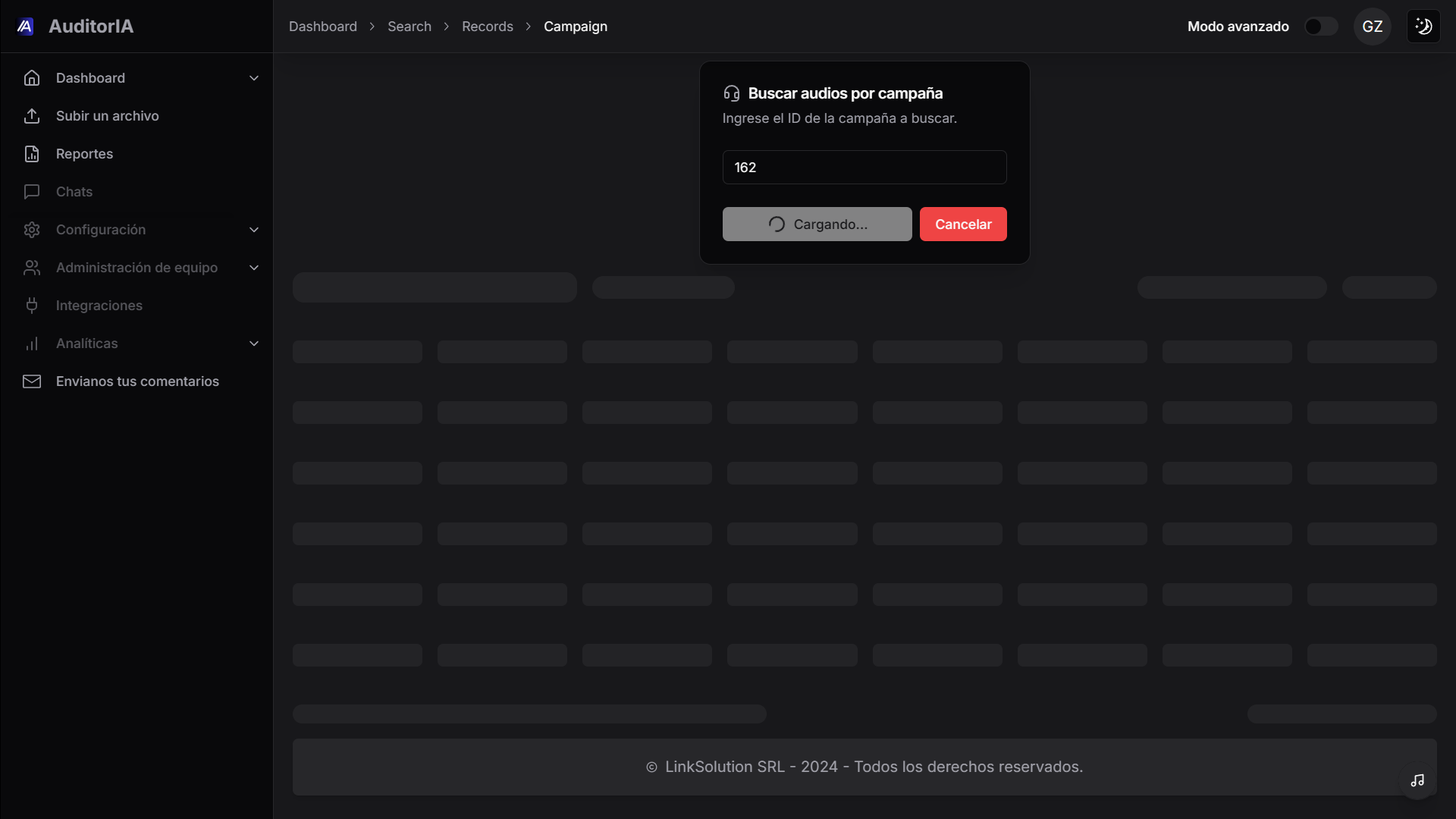
Enter the ID and click Confirm. The system builds the query using the composite index (campaign_id, date) for fast responses even on millions of records.
Result list
Results are shown in a dense table with server-side pagination.
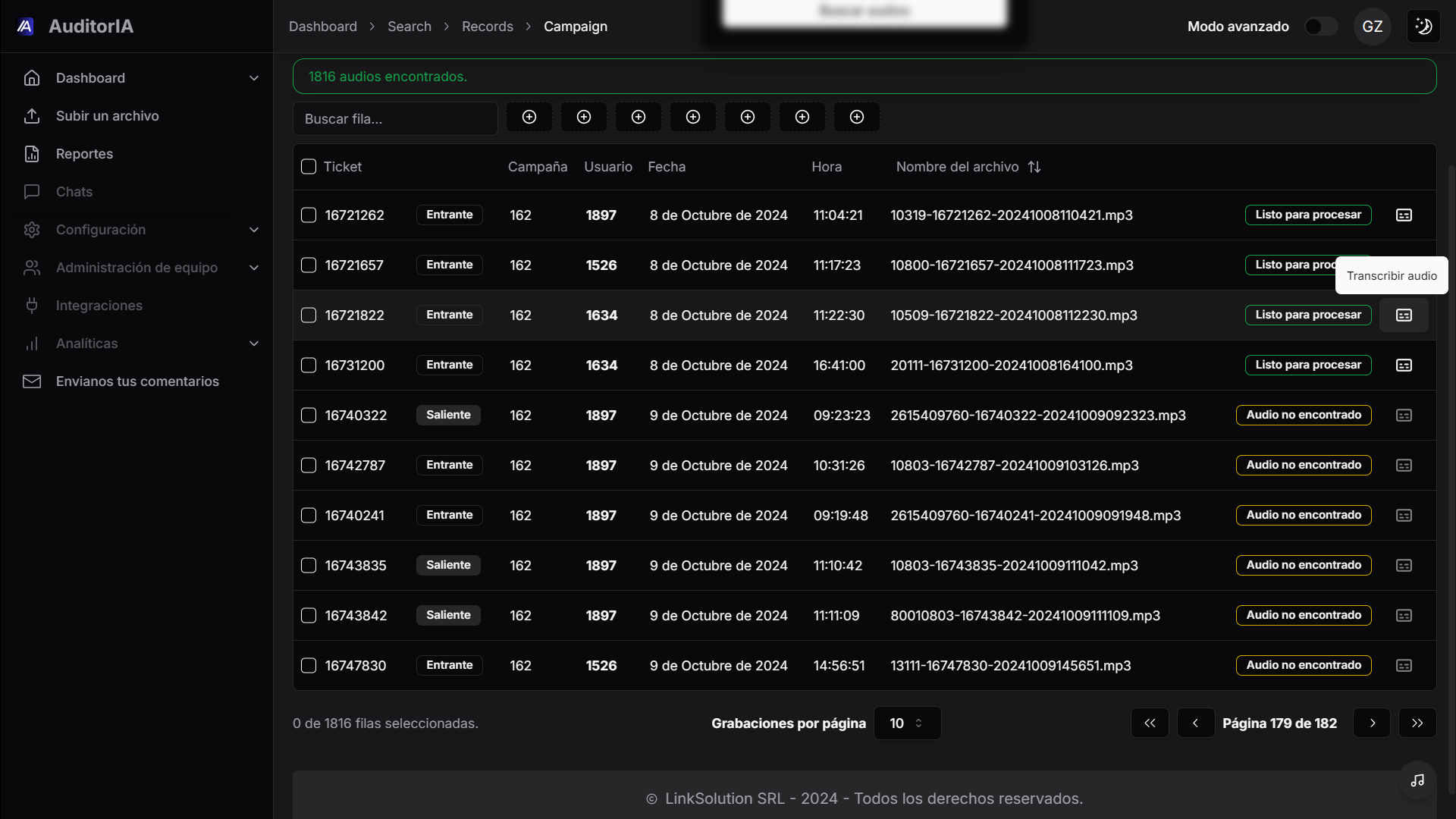
Columns
| Column | What it shows |
|---|---|
| ☐ | Checkbox for bulk selection |
| Ticket | Internal ticket ID (e.g., 16722762) |
| Campaign | Numeric campaign ID |
| User | Agent operator_id |
| Date | Call date |
| Time | Local time |
| File name | Original .mp3 name |
| Status | Badge: Ready to process, Transcribe audio, Audio not found |
Ticket states
| State | Meaning |
|---|---|
| Ready to process | Audio available, task not yet created |
| Transcribe audio | Hover → CTA to launch manual transcription |
| Audio not found | File is not in MinIO (deleted, never uploaded, rotated) |
Pagination controls
- Recordings per page: 10, 25, 50, or 100.
- Navigation:
<>+ page-number input. - Counter: "0 of 1816 rows selected" + "Page 179 of 182" in the lower corner.
Performance
The backend uses range queries (date >= :start AND date < :end) over composite indexes — date filtering is O(log n) even on tables with tens of millions of rows. See the architecture note.
Full history and combined filters
From the sidebar → Dashboard > History you access the advanced view with every available filter.
Available filters
| Filter | Type | Detail |
|---|---|---|
| Status | Multi-select | pending, processing, completed, error, approved, rejected |
| Date range | Date picker | Start / end, presets (today, 7d, 30d, custom) |
| Campaign | Multi-select | Respects user permissions |
| Operator | Autocomplete | By name or operator_id |
| Engine | Select | whisperx / openai / deepgram |
| Direction | Radio | inbound / outbound / any |
| Duration | Range slider | 0s to 2h |
| Score | Range | 0 to 100 |
| Sentiment | Multi-select | positive / neutral / negative |
| Tags | Chips | Filter by GPT-generated tags |
| Free text | Input | Full-text search within the transcription |
Combining filters
Example: completed tasks from campaign 162, by operator 1897, in the last 30 days, with negative sentiment, sorted by descending score.
Persistence
Filters are saved in the URL (?status=completed&campaign=162&...) so you can share the view by link.
Full-text search
The Text search field searches inside the transcribed content.
Supported operators
| Operator | Example | Behavior |
|---|---|---|
| Implicit AND | cancel service | Both words in the same segment |
OR | refund OR return | Either of the two |
"..." | "customer number" | Exact phrase |
- | sales -spam | Excludes the term |
~ | invoice~ | Fuzzy search (tolerates typos) |
Search engine
Texts are indexed in PostgreSQL using tsvector + GIN indexes for sub-second search up to ~10M segments.
Sorting
Click a column header to toggle asc/desc. Compound sorting is supported by holding Shift while clicking.
| Column | Order | Typical use |
|---|---|---|
| Date | DESC by default | See the most recent first |
| Score | ASC | Detect failed audits |
| Duration | DESC | Identify abnormally long calls |
| Operator | Alphabetical ASC | Group by agent |
Bulk selection and batch actions
- Use the header checkbox to Select all on the page.
- Or check tasks individually.
- A floating action bar appears:
| Action | Behavior |
|---|---|
| Approve all | Marks selected tasks as approved |
| Re-run | Reprocesses the selected tasks (same or different engine) |
| Export | Downloads CSV with the selected rows |
| Assign campaign | Re-associates the tasks to another campaign |
| Archive | Moves to historical archive |
Limits
- Max batch: 500 tasks per action (configurable per tenant).
- Re-run in batch re-queues in Redis and can saturate workers: do it outside peak hours.
Export
From the filtered listing:
- Apply the desired filters.
- Click Export.
- Choose format:
- CSV (Excel-ready, with UTF-8 BOM).
- XLSX (native Excel, with styles).
- JSON (object per task with full metadata).
- The file downloads as
auditoria-export-YYYY-MM-DD-HHmm.ext.
The export respects active filters. If you select rows, only those are exported; otherwise all that match filters are exported.
Performance
- Key composite indexes:
(operator_id, date),(campaign_id, date)oncall_logs. - Range queries for dates:
date >= :start AND date < :end(notDATE(col) = :val, which doesn't use indexes). - Server-side pagination:
LIMIT/OFFSETwith a boundedWHERE, avoiding millions of rows on the client. - Full-text search in PostgreSQL with
tsvector, refreshed on transcriptionINSERT/UPDATE.
Troubleshooting
| Problem | Cause | Solution |
|---|---|---|
| "0 results" with reasonable filters | Incorrect date range time zone | Verify TZ in profile (es-AR = GMT-3) |
| Pagination always returns the same page | Aggressive browser cache | Hard refresh (Ctrl + Shift + R) |
| Export > 100k rows takes a long time | Backend processes in background | Wait for the notification when ready |
| Full-text doesn't find obvious terms | Transcription not yet indexed (async) | Retry in 1–2 min |